
Start & Earn · Source-led
Moon Sweepers Beginner Guide: Your First Cleaning Shift
Quick answer
Your first paid delivery is simple: sweep lunar dust into the Toothbrush container, carry it to North Station, hold E or F at the intake to fill the station tray, then press the tray button to launch and get paid. Buy the $5 Nail Brush or a $5 Toothbrush container level before wandering far from the starting base.
First shift
Your first paid delivery, in order
Stay near North Station for this run. The first container holds only 0.5 kg, so the trip back is short and you can repeat the loop several times before buying anything.
- 01
Sweep a nearby patch
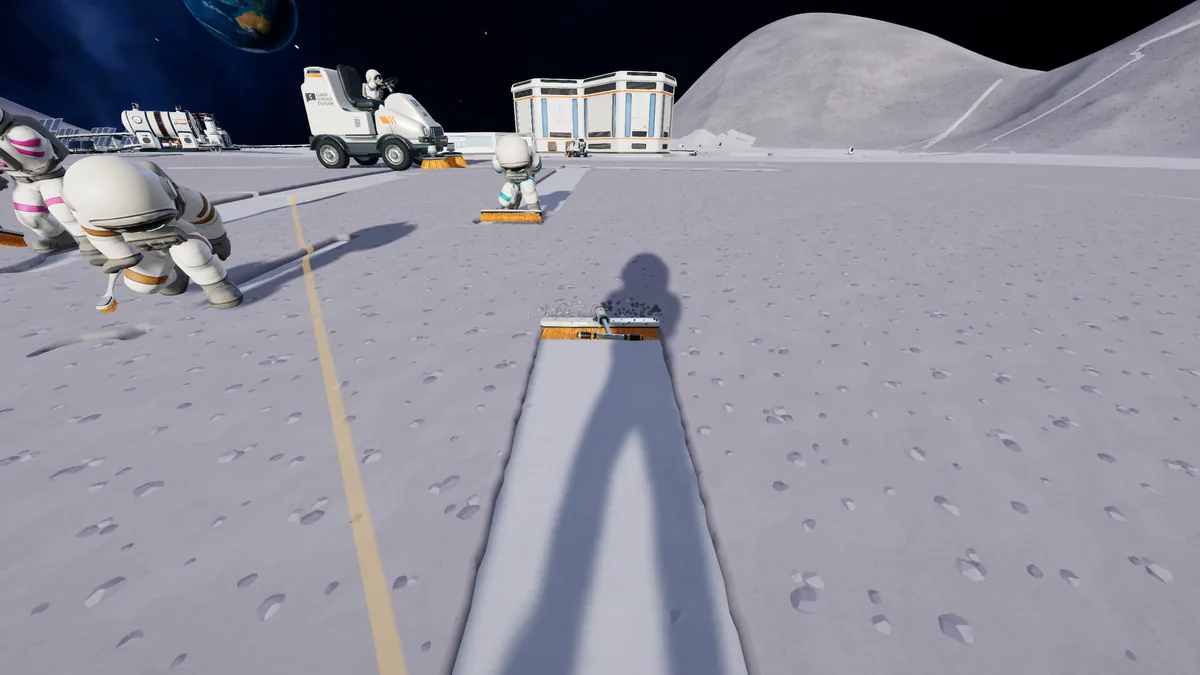
Face a dusty surface, hold the primary use button and keep the brush over the dust. The held tool fills as the ground turns clean. You do not need to clear a whole region for the first sale.
- 02
Return to the station intake
Walk back to North Station's deposit intake. Hold E or F at the intake until the tray shows the dust from your tool.
- 03
Launch the tray
Press the intake's sell button. The station launches the load and pays the crew wallet. The first deposit also unlocks the Dust Delivery achievement.
- 04
Buy one small improvement
At the supply wall, the Nail Brush costs $5 and the Hand Brush costs $10. The upgrade hologram behind the station service table sells container levels. A first Toothbrush container level also costs $5.
- 05
Repeat with a wider sweep or a larger load
The Nail Brush is wider; the container level lets you carry more before returning. Pick the one that matches the friction you just felt, then run the same loop again.
Early spending
What the first few dollars actually buy
At the start, the shelf is deliberately cheap. The useful question is whether you want to cover more ground per pass or spend less time walking back to the station.
| Choice | Price | Starting container | What it changes |
|---|---|---|---|
| Nail Brush | $5 | 0.75 kg | Wider than the Toothbrush; a small coverage upgrade. |
| Hand Brush | $10 | 1 kg | A little more width and capacity than the Nail Brush. |
| Household Broom | $25 | 3 kg | The first large jump in width and carrying capacity. |
| Toothbrush container I | $5 | 1 kg | Doubles the starting load without changing the brush. |
| Building Tool | $50 | — | Unlocks the build menu; buy it when you are ready to place machines. |
Prices and container values are from the Moon Sweepers 1.0.4 community data index. In-game prices are the final authority under your installed build and regional store settings.
A launch-week Destructoid route suggests cleaning the first 15 sections with the Toothbrush and then buying the Nail Brush. Another route recommends skipping the Nail Brush and saving for the Household Broom. Both are advice, not a quest check. The $5 Nail Brush is cheap enough to test; the $25 broom is the first purchase that changes the size of each load.
Recognise success
How to tell cleaning, storage and delivery all worked
- Cleaning: the lunar surface changes from dusty to a smooth, lighter strip under the brush.
- Storage: the container gauge beside the held tool fills as you sweep; it stops accepting dust when full.
- Delivery: the station intake tray takes the load, and pressing the button removes it from the tray.
- Payment: the crew wallet increases after the launch. Dust pays $1 per kg before payout upgrades.
- Achievement check: Dust Delivery unlocks on the first deposit at a depot or station.
Troubleshooting
Early mistakes and the cheapest recovery
| Symptom | Likely cause | Fix |
|---|---|---|
| The container fills after a few passes | The Toothbrush starts at 0.5 kg and the first brush is narrow. | Return to North Station, sell, then buy a container level or a wider brush. |
| You walked a long way and lost time | The Moon is divided into 163,842 sectors; the starting area is only one small part. | Use hold-R to return to base, then work outward from a station or place a Packager near the work. |
| You bought a Garage but cannot use it yet | The Garage costs $200 before any vehicle; the cheapest vehicle is another $300. | Leave the Garage until you have both costs. The building is a long-term convenience, not a first-hour requirement. |
| A building ended up facing the wrong way | The current build has no verified move or rotate control for placed structures. | Remove it and rebuild. Removal returns 75% of the build-menu price, so preview placement before confirming. |
The first route does not require a conveyor, a pressure chamber or a robot. Those systems matter once manual trips become the bottleneck. The automation guide starts from a working station deposit and shows where each machine fits.
Continue
What to open after the first sale
Straight answers
Questions about this task
Do I need to build a depot before my first delivery?
No. Use the deposit intake at North Station, where the game starts. A placeable Packager becomes useful when you are working far from a station, and it costs $100.
Do I have to clean exactly 15 sections with the Toothbrush?
No. Fifteen sections comes from a launch-week guide's suggested route. It is not a quest trigger or a hard requirement. It is a rough stopping point for the first Toothbrush run.
Should I skip the Nail Brush and save for the Household Broom?
That is a reasonable route if you dislike making several small purchases. The Nail Brush costs $5 and gives immediate extra width; the Household Broom costs $25 and is the first large capacity jump. Choose based on whether walking back or narrow coverage is slowing you more.
Trace the answer
Sources and scope
This is an independent, source-led guide, not a first-hand playtest. Gameplay values, build-menu details and UI behavior are checked against the 1.0.4 data snapshot and official patch notes. Your installed build is the final authority.
- Official Moon Sweepers on Steam Official store description, release date, modes and requirements. Checked 28 Oct 2026.
- Reference Destructoid: best way to clean the Moon Launch-week route and early tool advice, published 25 Oct 2026. Advice, not official instructions.
- Reference Destructoid: complete Moon Sweepers walkthrough Alternative early route and garage costs, updated 27 Oct 2026.
- Reference Wikily: Prices and starting tools Moon Sweepers 1.0.4 data index, checked 28 Oct 2026. Useful for build-menu values; not an official developer page.
- Reference Wikily: Collector and stations Moon Sweepers 1.0.4 data index, checked 28 Oct 2026. Useful for build-menu values; not an official developer page.
- Reference Wikily: Controls Moon Sweepers 1.0.4 data index, checked 28 Oct 2026. Useful for build-menu values; not an official developer page.